Showing posts with label future moblie. Show all posts

Friday, November 12, 2010

Palm Pre Plus

 
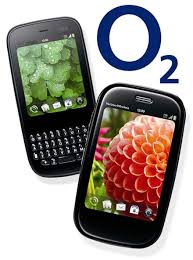
The Palm Pre Plus isn't wildly different to the original Pre, it's more of a service pack release. Not much has changed other than the double memory size for both storage and running applications. Holding back the WebOS operating system is a lack of applications, where there are just over 2,200 as compared to the many thousands on Android. An element we would have liked to have seen in this version is auto correction for typing, which is now standard on every OS apart from the Palm. Also, we would have liked to have seen the mobile hotspot application by Palm shipping in the UK version. This enables the Pre Plus to be a MiFi device too, which has proven to be popular in the American version and is a great selling point for the device. For More Detail

Palm Pixi Plus


The Palm Pixi Plus – the Pre's dinky sidekick – makes its UK debut and is the latest smartphone to offer a scaled down, affordable alternative to a premium handset.
The new and improved Pixi follows the Sony Ericsson Xperia X10 and HTC HD Mini into the arena, all of which boast most of the main features without the cumbersome size and cost. Can this be the handset to help web OS reach the masses?
The original Pixi was a US-only release, so we'll treat this as a brand new handset. Not that we have to go into too much detail, the improvements can be summed up in one word: Wi-Fi.
The Pixi earns its Plus by adding 802.11b/g Wi-Fi, but aside from that it's exactly the same handset. 

Friday, November 5, 2010

HTC Legend


After four three flavors of the HTC Hero, the Taiwanese mobile giant has finally brought back the chin with an additional lick of aluminum and a similarly quirky name -- the Legend. If this alone isn't of much interest to you yet, just bear in mind that this is HTC's first Android 2.1 device with Sense UI. It didn't take much for us to fall in love with this Android phone at MWC -- HTC convinced us of its unibody toughness by banging it against the wall, and needless to say, the vibrant AMOLED screen caught our eyes, too. However, there are still some questions to be answered before we can decide whether the Legend lives up to its name, especially on battery life, wireless reception, camera quality and software performance. Unless there have been major tweaks, we'll try not to bore you with features already seen on the Hero -- so please, won't you join us? For More Detail

HTC HD2


It sounds like a recipe for success: take the surprisingly popular HTC HD2, shrink it down some, and offer it as a more pocketable alternative. Yet out of the three devices HTC announced at Mobile World Congress in February, the HTC HD mini has prompted the least interest. The HD mini has to convince prospective buyers not only of its own merits but that it’s worth buying into an ageing OS that’s just months away from replacement. Can it deliver? Check out the full SlashGear review after the cut.
At its launch, HTC told us that the HD mini embodies their new “Hidden Power” design ethos, where the structural form of a device is embraced by its aesthetic rather than hidden away. Most obvious are the four exposed screw heads that emerge through the rubbery back cover, being not just decorative but what’s actually holding the whole phone together. The front, meanwhile, is a single pane of glass, with a 3.2-inch HVGA 320 x 480 capacitive touchscreen and five touch-sensitive buttons for Call, Home, Start, Back and End. On the side there’s a volume rocker while up top a small power button doubles as the lock key; on the very bottom there’s a microUSB port.
Take off the rubberised back plate and you’ll find HTC have finished the entire rear of the phone with a bright yellow finish, complete with matching battery. It’s eye-catching, certainly, but we can’t help but wish you could see it without having to open the whole thing up. HTC expect transparent or colored aftermarket cases to show up shortly after the HD mini launches, but they’ll need to be more than just silicone skins since the antenna is embedded into the lower section of the cover. It remains to be seen whether HTC’s business market will see the appeal. For more Deta

Thursday, November 4, 2010

HTC Snap


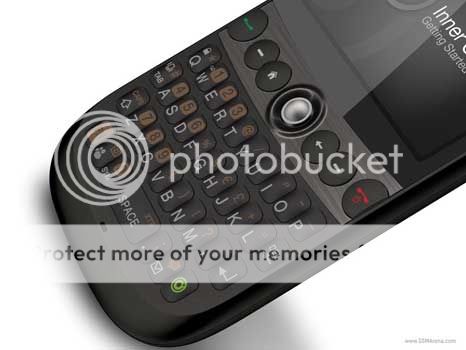
With their famous Touch series, HTC seem to have cut down on the production of less sophisticated devices, running Windows Mobile 6.1 Standard, which are by far, not to be underestimated, especially when equipped with decent QWERTY keyboards. For an instance, the HTC S740 turned out to be a viable alternative to the Touch Pro, which is a side-sliding, hefty cell phone, not really comfortable to carry around in your pocket. The Snap is the first full QWERTY keyboard candy-bar handset that HTC have made since 2007 and the form factor has allowed the manufacturer to make the phone quite thin (12 mm), so you will not end up with your pocket bulging out too much, plus its black color makes the phone look even slimmer than it actually is. Aside from the handset, what you will also find in the box are: USB cable to connect the device to a PC that comes with adapter to quickly turn the cable into a charger, software CD, user guide and quite nicely looking earphones.

The keyboard has four rows with all keys having the same shape (except for the space button), convexity and they all lack enough travel. On the overall, we didn’t have any troubles typing things away, even with one hand, although we had to keep an eye on what we were punching in all the time, because we couldn’t make out what was the button we had just pressed. Keyboard might become a serious, vexing issue to people with thicker fingers, unlike the one the BlackBerry Bold comes equipped with. Still, we are pleased many keys sport pre-assigned shortcuts that allow fast access to, say, your messages or camera interface. The button that bears a small, green circle marking calls up your “Inner Circle” on screen, but we will tell you about this a bit later.  For Detail

Nokia X6

NOKIA'S OUTING IN the music phone arena is relatively new compared to Sony Ericsson. How the Finnish phone maker distinguishes itself from other handset makers in the musical phone market is with its unlimited music download service Comes With Music. Tracks and albums can be purchased separately or with a few of Nokia's handsets there's an unlimited music download option bundled in.
Nokia's first music oriented phone in its Xpressmusic category was launched at the end of 2008. That Nokia 5800 was a full touchscreen phone that could be purchased either by itself, or with the all-you-can-eat music download service thrown in. Its successor is the Nokia X6, which has some distinct improvements over its predecessor in terms of its screen, storage size, build quality and form factor.

BlackBerry Storm2

The first version of the BlackBerry Storm was widely panned for its shortcomings, but the Storm 2 has its own set of flaws, based on my extended use of the phone.
The updated Storm was announced back in October of last year so the phone has been out there for a while. And long enough for me to realize that it has a couple of fairly serious issues--at least the particular phone that I use does.
Let me be clear, I am a longtime user of both the original Storm and now the Storm 2. And I actually had fewer complaints about the original, frequently criticized Storm than the relatively well-received Storm 2.
Buttons: What's my beef? The most persistent problem is with the four buttons at the base of the screen (see photo). Simply put, sometimes the buttons don't work. This can be an annoying problem because these buttons must be used constantly.
As one example, the buttons used to make and end a call often don't work. Only after poking repeatedly on a precise location on the button (or tapping on the main screen, then tapping the button) can I make or end a call.

Samsung Solstice


Haven’t sifted through enough smartphones this summer as is? Meet latest contender the Samsung Solstice SGH-A887, which uses a Java-based operating system capable of handling some applications and programs without the hassle of learning how to use Windows Mobile. But is the handset worth your time and money? With the Samsung Widget Bar in tow you might just think so… until you realize just how unfriendly the device is towards third-party apps, that is. Oh, and if you should happen to be a Gmail user, you’re out of luck as well – the onboard email client doesn’t support the service either, another annoying ding against the phone right out of the starting gate.
Weighing in at 3.33 ounces, the Solstice feels surprisingly solid in your hands. Wrapped in a gunmetal bezel, we thought it was odd though that the 3-inch screen didn’t take up as much of the handset’s façade. There’s over 1/8th of an inch between the edge of the screen and bezel on the sides and over a 1/4th an inch between the top of the screen and earpiece.

Wednesday, November 3, 2010

Samsung Impression

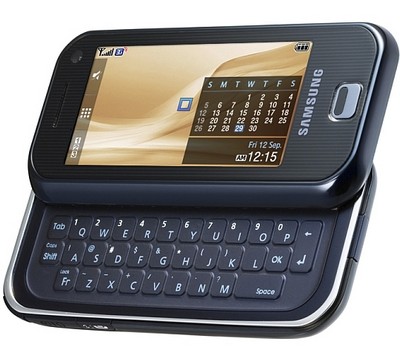
 The Samsung Impression is one of the many phones AT&T dropped a few weeks back that features a full QWERTY keyboard. The Impression stands out from the rest as a full touchscreen device that uses an AMOLED display. The phone mimics many smart phone features, and has a very polished UI that reacts smoothly to the user’s command. It’s honestly a great feature phone, yet the experience using it left me feeling I was using a very limited smart phone, which might be the point. As a result, I was left comparing the Impression to the iPhone, not because the iPhone is so great, but simply because the iPhone is the direct competitor for the Impression, especially at the $199 price tag. Users who are looking at the Impression need to think long a hard and analyze their needs before buying this device.

Design, Styling and UI

The device is smooth and curved. It feels good in the hand and weighs enough to give the impression of quality. The subtle chrome accents make the Impression stand out, and small features, like a proximity sensor to turn off the display when near your face, add to the overall quality of the Impression.
TouchWiz on the Samsung Impression is fast and fun to use. Dragging widgets onto the background from the side dock was fun, and the variety of widgets kept me entertained. My favorite is the widget to cycle through pictures and assign the phone a new background. It eliminates so many steps that other phones have you go through.  There’s also a dedicated Bluetooth widget that makes for easy pairing, and even gives a cool graphical representation of nearby devices, making selection quick and easy. The media player was simple enough, and the microSD card expansion slot allows for 16GB of additional storage, one-upping the iPhone there.

The Display

Whatever else this phone offers, the first thing you notice, and the biggest selling point, is the AMOLED display. It looks absolutely gorgeous in any light, including direct sunlight.  The colors are vibrant and it makes details on the screen pop out.  The display is a 3.2” wide TFT touchscreen and offers 256K color support at the resolution of 240 X 400. The display is the real draw to this device. AMOLED is brighter, has better viewing angles, and consumes less power than previous generations of displays.
The actual touchscreen is capacitive, and offers the user haptic feedback whenever they make a selection or scroll through menus.  The one issue I have with the screen is the thin plastic they use as the main touch surface: it scratches way too easily from objects that aren’t even sharp enough to scratch other phone screens. If you buy this phone, get a screen cover.

The Phone

The Impression is a good phone. Call quality was excellent on both ends. The signal usually remained strong in my area, never dropping below 3 bars, and the reception was clear and sounded good. The speakerphone on the Impression also worked well. Using it on the road, the caller was still able to hear me, and I could hear and understand them well. For more Detail